Connecting the .NET API to the database
Or the first step that needs to be done
As stated in my previous post I am developing a companion app for D&D. The tech stack for this will be a Next.js frontend, with a C# .NET API backend and using a SQL database. First thing to do was to create the development environment, and this meant selecting the .NET Web API on Visual Studion.
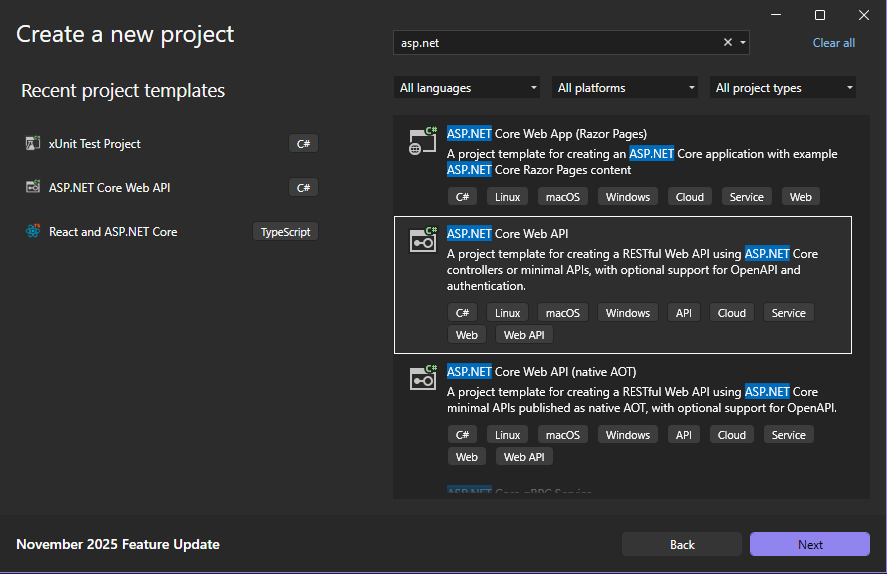
With a fresh API created, I needed to point it to a database before I could start writing any code I wanted. First I had to download some packages. These packages were:
- Microsoft.EntityFrameworkCore
- Microsoft.EntityFrameworkCore.SqlServer
- Microsoft.EntityFrameworkCore.Tools
These packages allow us to run queries for the database and to develop the database using a code first approach. This means that rather than creating the database and it's tables seperately and then writing code that points to it, we create the entitiies that will be the tables in the API, then run commands that create the tables in the database. This is a great way to create the database when you are a developer as it means you're less likely to make a mistake in linking the code to the database.
Creating a Models folder to store all the entities, I needed three classes. They were:
- A model for characters
- A model for quests
- A database context class which tracks the entitiesn and allows the code to communicate with the database
Character.cs
using System.ComponentModel.DataAnnotations;
using System.ComponentModel.DataAnnotations.Schema;

namespace ToffeeTavern.Server.Models
{
    [Table("C_CHARACTER")]
    public class Character
    {
        [Key]
        [Column("C_ID")]
        public int Id { get; set; }

        [Column("C_NAME")]
        public string Name { get; set; }

        [Column("C_LEVEL")]
        public int Level { get; set; }
    }
}
Quest.cs
using System.ComponentModel.DataAnnotations;
using System.ComponentModel.DataAnnotations.Schema;

namespace ToffeeTavern.Server.Models
{
    [Table("Q_QUESTS")]
    public class Quest
    {
        [Key]
        [Column("Q_ID")]
        public int Id { get; set; }

        [Column("Q_C_ID")]
        public int CharacterId { get; set; }

        [Column("Q_TITLE")]
        public string Title { get; set; }

        [Column("Q_DESCRIPTION")]
        public string Description { get; set; }

        [Column("Q_QUEST_GIVER")]
        public string QuestGiver { get; set; }

        [Column("Q_LOCATION")]
        public string Location { get; set; }

        [Column("Q_PRIORITY")]
        public Priority Priority { get; set; }

        [Column("Q_TYPE")]
        public QuestType Type { get; set; }

        [Column("Q_STATUS")]
        public QuestStatus Status { get; set; }
    }

    public enum Priority
    {
        LOW,
        MEDIUM,
        HIGH
    }

    public enum QuestType
    {
        PERSONAL,
        PARTY
    }

    public enum QuestStatus
    {
        TO_DO,
        IN_PROGRESS,
        DONE
    }
}
One personal addition you might notice is the table and column names that I've included using the Data Annotations. This is just my own personal preference when it comes to databases as I find it can make things easier when running SQL queries and it can help to keep the database more organised.
ToffeeContext.cs
using Microsoft.EntityFrameworkCore;

namespace ToffeeTavern.Server.Models
{
    public class ToffeeContext :DbContext
    {
        public DbSet<Character> Characters { get; set; }
        public DbSet<Quest> Quests { get; set; }

        public ToffeeContext(DbContextOptions options) : base(options)
        {

        }
    }
}
This is the code for my API's database context, which references the DbContext class. It is required to to reference all the entities we want for our database, and then it needs a constructor with an input of DbContextOptions.
With those in hand, the next step is to start actually give it a connection to a database.
A connection string needs to be provided in order to point to the database (which granted hasn't actually been created yet but that doesn't matter at the moment).
At it's most simplest the connection string will need four things:
- The server the database is stored on
- The name of the database
- Whether the connection is trusted
- Whether there is a certificate that can be trusted
The connection string I show you is likely not bext practice for an application in production, but just for my own personal development environment, this will do:
Server=*********;Database=ToffeeTavernDb;Trusted_Connection=True;TrustServerCertificate=True
(Your server name would have to match your own one, naturally)
The name we write for the database can just be the one you want to give the database. The best practice for this is to place this connection string in the appsettings.json file.
{
  "Logging": {
    "LogLevel": {
      "Default": "Information",
      "Microsoft.AspNetCore": "Warning"
    }
  },
  "AllowedHosts": "*",
  "ConnectionStrings": {
    "DefaultConnection": "YOUR_CONNECTION_STRING_HERE"

  }
}
And then it can be called from Program.cs or Startup.cs file:
var builder = WebApplication.CreateBuilder(args);

builder.Services.AddDbContext<ToffeeContext>(options =>
{
    options.UseSqlServer(builder.Configuration.GetConnectionString("DefaultConnection"));
});
This is essentially the end of the code portion of connecting to the database. Now we get to run some commands to create it.
First, we have to create a Migration. This is basically a file that has the code that will be run to create and make changes to the table, and it's done by opening the Package Manager Console and running the command:
add-migration
Each migration you create will need a name written after the command. SOmething like InitialCreate works fine.
You should then see a new folder created called Migrations
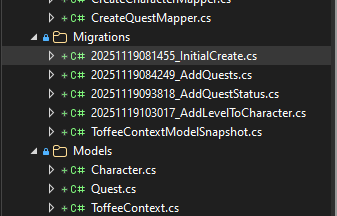 (There's a few more here from further development I have done)
Then, with the migration created, it can be run with the command:
update-database
If succesful you should see a message staing it has been created, and then you can open it up using SQL Server Management Studio or some similar database management program and see that it has been created, tables and all.